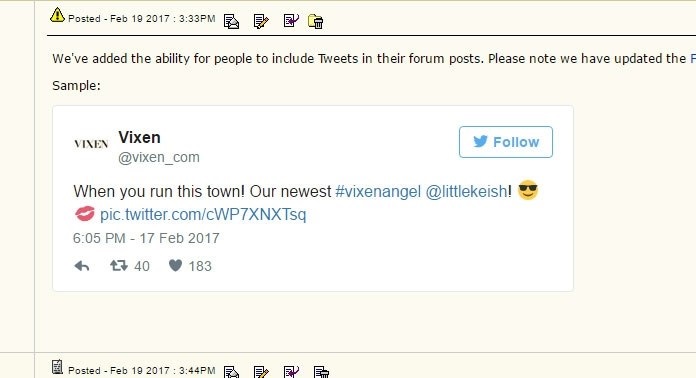
We've added the ability for people to include Tweets in their forum posts. Please note we have updated the Forum Etiquette related to the use of Twitter content in your posts here. Sample: [Tweet is no longer available] Edited by - Drew Black on Mar 4 2017
And here's a 1 minute video tutorial on how it works. Also, if you would like to see the photos and videos included with Tweets you need to change the "Hide Tweet Media" setting in your forum profile. All accounts default to the "hide media" setting. You need to specifically opt-in to see the media included with Tweets here. Video tutorial: [Tweet is no longer available]
If you have questions about the new Twitter integration features please post them here.
[Link]
nietzsche Deactivated User
5470 Posts 8/03
Posted - Feb 19 2017 : 6:08PM
strange coincidence, on the same day President Trump asked me to start putting up his posts on ADT (he's very busy you see, and he asked me to do it for him) Edited by - nietzsche on 2/19/2017 6:11:07 PM
There's a new option in your settings too that controls the display of Tweet images and video. If you do not want to see the media included with embedded tweets you need to change the "Hide Tweet Media" setting to "Yes" in your profile. Anonymous users or people not logged into their accounts will not see any Twitter media here in the forum.
Or should I change it so the default is that all registered users see Tweet media and they can opt-out if they choose? What's better: opt-in or opt-out? I assumed opt-in would be preferred but I could be wrong.
I think opt-in is better. Escpecially since twitter media can contain videos and sound, not everybody will be happy with those showing up and playing unasked. Jacco
Thanks Jacco. I agree, but I think most people will not realize that there's an option to see Tweet media. And if they never see it they won't know what they're missing. But if the default is to display media and they don't want to see it they will certainly go looking for a way to disable it. Videos do not play automatically.
This is redundant and a little clunky... When viewing the forum would you like to see the images and videos included in Tweets? Hide tweet media: Yes, No. not least because if you don't want to view Tweet media then your answer to the first question is 'Yes', but your answer to the second question is 'No'. Would it not be simpler just to ask the first question and make the actual choices "Hide Tweets" and "Display Tweets"? (dropped a word)
There's actually a difference between "hide tweets" and "hide tweet media". Media is an attachment to a Tweet and can be represented as a link or displayed with the Tweet. Hiding a tweet, I'm assuming here, would mean that the user prefers to just see the tweet's URL and not render any of the text content. Or am I misunderstanding what you're saying?
Just to clarify, here's screenshots of the Tweet I included in the first post of this topic. One with media displayed and the second with it hidden. The tweet is still displayed in both cases, just differently.
Apparently the forum plugin simply displays nothing if the tweet ID is invalid. (Quote this post to see what I mean.) That could be a bit odd when somebody's commenting on an embedded tweet and suddenly there's nothing there anymore. [Tweet is no longer available] By the way, the "display tweet media" setting doesn't seem to affect the post preview window, tweets are always shown without the media there - is that intentional? Edited by - shalalin on 2/21/2017 6:37:59 PM
Hmm. I'll check the preview window. It should display what you would see. Also, we cache a Tweet response based on the time-to-live that Twitter provides when we first process a twitter status URL. After the cache period the forum will go out and check again and try to cache the new response. If the Tweet is no longer available it's supposed to say [unable to process Tweet] or some other error condition. The code does parse the HTTP response code and the JSON response data if provided. I'll check into it tomorrow to see why it's not handling an invalid tweet status URL properly.
I had a bug in the way I was handling Twitter's response codes. It's been fixed. You can see in the posts above that the tweets that are have been deleted now show that fact. Going to work on the media hidden/not hidden in the preview window now.
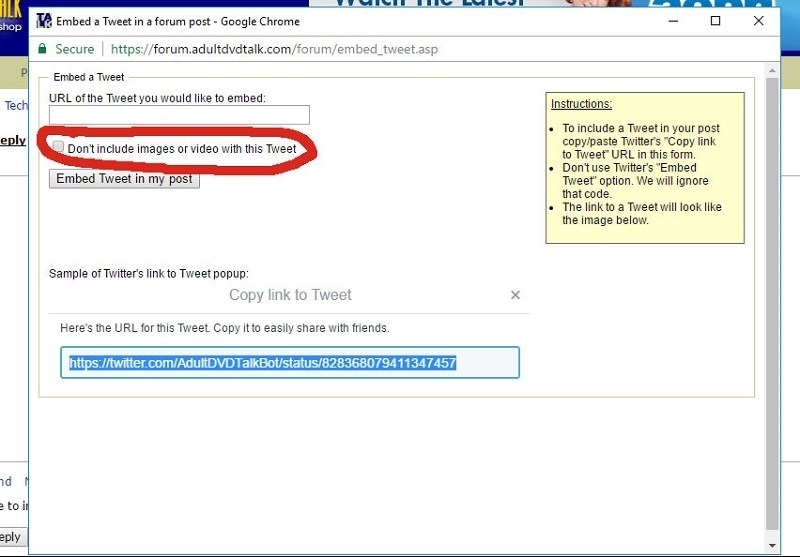
After some feedback from a few members that are using the embedded Tweet features I've decided to add a small change to it. Members were asking for a way to embed a Tweet but not the photos attached to a Tweet. There is now a checkbox on the "Embed Tweet" popup page to allow you to make that decision. If you prefer to use the quicker forum shortcode for a tweet with no media it becomes "[ htweet= ]" instead of "[ tweet= ]". Think of it as 'hidden media Tweet'.
[Link]
Mass Facialties Deactivated User
"Facialized Vol. 7" 2021 AVN Awards Winner: Best Oral Movie 9307 Posts 9/13
Posted - Feb 28 2017 : 1:10AM
Okay, I just tried doing this for the first time and I don't get it. I want a tweet to appear like this... ...but instead, I'm only getting this: [Tweet is no longer available] Edited by - Mass Facialties on 2/28/2017 1:13:00 AM
The image and the Tweet look exactly the same for me. Well, not exactly the same. The image and the tweet have different like counts because the image is older than the tweet. Edited by - Drew Black on 2/28/2017 9:01:21 AM
[Link]
Mass Facialties Deactivated User
"Facialized Vol. 7" 2021 AVN Awards Winner: Best Oral Movie 9307 Posts 9/13
Posted - Feb 28 2017 : 3:04PM
^ For some reason (regarding my post above), the first tweet image shows what I want-the pic of Keisha along with the exact tweet (exactly as it appears on the Twitter page). However, the second tweet image I posted there shows a plain text tweet, not what I want. For the record, in my profile, I have the "Display Tweet images and videos" option selected. Despite this, every posted tweet I've seen in numerous posts across the forum only appears as plain text.
The Tweet content renders from Twitter's servers. So there is likely a setting in your Twitter account that is controlling the display of 'sensitive media'. I'll see if I can find it.
Log into Twitter. Go to the Profile Settings page. At the bottom of the Privacy and Safety page there is a checkbox for "Warn me before showing media that may be sensitive". It's possible that with that option checked Twitter's widget may be deciding you don't want to see media on Tweets.
I've just tried it with and without that setting, and also while not logged into a Twitter account at all - I'm seeing the full tweet in all scenarios. Maybe there's a browser version that doesn't render the display correctly?
[Link]
Mass Facialties Deactivated User
"Facialized Vol. 7" 2021 AVN Awards Winner: Best Oral Movie 9307 Posts 9/13
Posted - Mar 1 2017 : 7:36PM
^ Now that you mention it, I think it could be a browser issue that's the source of my problem. Today, I found that the two tweet images I posted above both appear the same on my iPad (Google Chrome) with the Keisha Grey pic and the exact tweet, whereas on my laptop (Mozilla Firefox) I continue to see the tweet images appear differently. And like you, I don't have a Twitter account-when I go to the account of a pornstar or studio, I just google it and go.
^ I haven't used Firefox in years - does it have some sort of built-in ad blocker that could be filtering out the images? Or maybe an extension you've specifically installed for that purpose?
I could see an ad blocker preventing the Tweets from rendering. The scripts from Twitter modify the page source in a very similar fashion that ad serving software does. They wait for the page content to finish loading in the browser and then make changes to it via to pull content from elsewhere.
#SDNY he's all yours. -- Michael Steele 5110 Posts 3/03
Posted - Mar 25 2017 : 3:38PM
If the tweet includes a video, and the frame of video that is displayed under the "play" button happens to be a hardcore image, do we have to worry about the image policy?
It looks like the Twitter function is down right now. Your post is right I checked it. I just tried one of mine and I am getting the same result. I will contact Drew.
I haven't been able to see the tweets properly when using Firefox for two days now. No problem on Chrome. Anyone else with this issue? I've had some other computer problems lately so I'm trying to figure out whether these things are related. This is what an embedded tweet looks like for me right now: When it should look like this: (From this post.)
^ OK looks like I fixed it. It was a problem with changing settings in firefox tracking protection, which I changed back.
[Link]
Mass Facialties Deactivated User
"Facialized Vol. 7" 2021 AVN Awards Winner: Best Oral Movie 9307 Posts 9/13
Posted - Mar 22 2018 : 12:42AM
I've been wanting to ask for a while now, and I've been wondering if anyone else notices it...do embedded tweets on a thread page interfere with the "jump to post" feature? I find that when a thread page has embedded tweets in it, I do not get directed to the first unread post. Instead, I always seem to get directed to a spot much further up the page, to where I have to scroll down several posts every time I click on the thread to get to the latest (unread) post. On the other hand, when a thread page does not have any embedded tweets in it, the "jump to post" feature works as it should. Is this just a problem for me and my web browser (Google Chrome) or have others noticed this as well?
any reason the tweets are no more displayed with images included and in the white box? They seem to appear as plain text at the moment (on the beige background), and no images... Hm, it appears my Adblocker Ultimate is to blame... for some reason or other... If I disable it, all works as expected. Edited by - lex von v on 4/26/2018 6:34:08 PM
The script that loads the Tweets operates very similarly to some ad networks. I could see ad blockers preventing Tweet embeds because they come from a different domain.
[Link]
Mass Facialties Deactivated User
"Facialized Vol. 7" 2021 AVN Awards Winner: Best Oral Movie 9307 Posts 9/13